


You’re cruising through the Rockies, your GPS is dying, and your passenger’s phone is at 4%. The anxiety is real. On long Colorado drives, navigating mountain passes and remote stretches means your devices are working harder than ever, draining batteries faster. The problem isn’t just finding a charger; it’s having a fast car charger for long drives that can keep up with navigation, streaming, and camera use. Without the right power solution, a scenic road trip can quickly become a stressful hunt for an outlet. This guide will show you exactly how to keep every device powered from Denver to Durango.
Why Do Your Devices Drain So Fast on Colorado Drives?
The unique conditions of Colorado driving—from high-altitude sun glare to constant elevation changes—force your devices to work overtime. Your phone isn’t just idling; it’s constantly searching for cellular towers, using GPS for twists and turns, and often running apps for trail maps or weather. This high demand requires a power source that outputs more than a trickle.
The Impact of High Altitude and Mountain Terrain on Battery Life
At higher elevations, your phone’s radio works harder to maintain a signal, especially in valleys. Additionally, the bright Colorado sun forces you to crank up screen brightness just to see the map, which is the number one battery killer. Cold temperatures at higher passes can also slow down lithium-ion batteries, making them drain faster than normal. A standard USB port simply cannot compensate for this increased draw.
Multiple Devices Versus a Single-Charge Scenario
Today, it’s rarely just one device. You likely have a phone for navigation, a tablet for the kids in the back seat, and a smartwatch tracking your hike. Charging them sequentially is inefficient. A robust fast charger must have multiple output ports to deliver high wattage simultaneously, ensuring the phone isn’t charged at the expense of the tablet.
Why Standard Car USB Ports Fail You
Most factory-installed USB ports in vehicles are designed for data or low-power audio, usually outputting around 5 watts (5V/1A). This is fine for maintaining a phone in airplane mode but insufficient for running GPS while charging. You need a dedicated 12V socket adapter that can deliver 18W, 30W, or even 45W to actually increase battery percentage while the screen is on.
What Specs Matter Most in a Fast Car Charger?
To truly fast charge, you need to understand the charging protocols. It’s not just about the physical port; it’s about the technology and power output (wattage). Look for chargers that support Power Delivery (PD) and Quick Charge (QC) standards, as these are the industry norms for fast charging speeds.
Decoding Wattage: What Is 30W vs. 45W vs. 65W?
Wattage determines speed. A 20W charger will charge an iPhone faster than a 5W charger, but a 45W charger is required for most modern laptops or tablets. For a phone, 18W-30W is usually the sweet spot for rapid charging without overheating the battery. For a MacBook or high-end Android phone, 45W-65W ensures you can actually use the device heavily while it charges.
- 18W-20W: Ideal for smartphones (iPhone 13-15 series, older Androids).
- 30W: Best for tablets and newer flagship phones (Pixel 8 Pro, Galaxy S24 Ultra).
- 45W-65W: Necessary for laptops and USB-C powered notebooks.
To ensure your vehicle is fully prepared for long road trips, make sure you Inflate Tires Faster with a High-Speed Portable Inflator before heading out.
Understanding Power Delivery (PD) and Quick Charge (QC)
Power Delivery is a universal standard that allows for higher voltage and current delivery over USB-C. Quick Charge is Qualcomm’s proprietary standard (usually USB-A). A charger that supports both ensures compatibility with virtually any device you bring along, whether it’s an Apple or Android device.
USB-C vs. USB-A: Which Port Type Should You Prioritize?
USB-C is the future and supports the fastest speeds. You want a charger that has at least one dedicated USB-C PD port with high wattage. While USB-A is older, having one port for legacy devices (like older cameras) is still useful, but the USB-C port should be your primary focus for speed.
How to Choose the Best Fast Car Charger for Long Drives?
Choosing the right charger involves assessing your vehicle’s socket location and your specific power needs. Don’t just buy the most expensive one; buy the one that fits your device ecosystem. If your car’s 12V socket is loose, you’ll need a charger with a tight spring mechanism to prevent disconnection on bumpy roads.
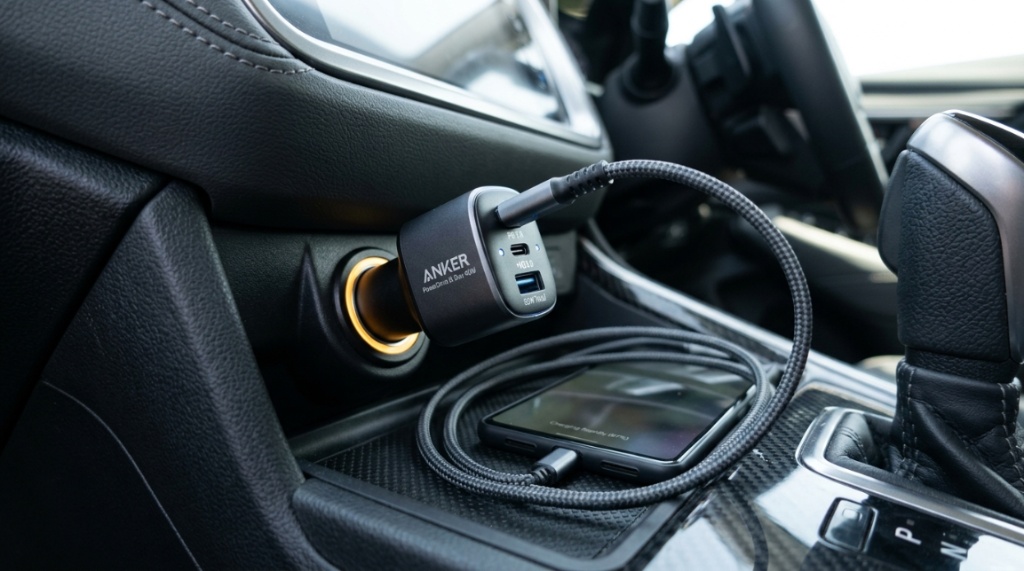
Look for Safety Certifications and Overheat Protection
An under-quality charger can short-circuit or overheat, damaging your car’s fuse or your phone. Look for certifications like CE, FCC, or UL. Active protection features against overcurrent, overvoltage, and high temperatures are non-negotiable for peace of mind on a remote trail.
Case Study: Charging an iPhone and iPad Simultaneously
If you are running an iPhone (20W max draw) and an iPad Pro (30W max draw) at the same time, you need a charger that can intelligently split the power. A basic dual-port charger might limit both to 10W. A high-quality 45W charger will allocate power dynamically—sending 30W to the iPad and 15W to the iPhone. This ensures both devices charge at reasonable speeds.
The ‘Cable Factor’: Why You Cannot Use a Cheap Cable
You can have a 65W charger, but if you use a USB-C cable that only supports USB 2.0 speeds (60W max) or a poor quality cable, you will be stuck at 10W. Invest in a 100W rated USB-C cable (marked as E-marked). This is the final link in the chain for fast charging efficiency.
Which Charger Type Is Best for Colorado’s Climate?
Colorado experiences extreme temperature swings—from freezing mornings to hot afternoons. The charger’s build material matters. Metal-bodied chargers dissipate heat better than plastic ones. In direct sunlight, a plastic charger might warp or throttle its speed due to internal heat.
Compact vs. Heavy-Duty Chargers for Dashboards
Compact chargers sit flush in the socket, which is great for tight spaces. However, heavy-duty chargers often feature thicker cables and better cooling fins. For long drives, a slightly longer body often provides better grip and heat dissipation, especially if you are using a hotspot for the kids’ iPads.
Is a Wireless Car Charger Fast Enough for Navigation?
Wireless charging is convenient, but it generates more heat and is slower (usually 7.5W-15W). If you are using GPS with maximum brightness, a wireless charger usually maintains the battery level rather than actually charging it. For a long drive where you need to top up, a wired connection is the most reliable option.
How to Mount Your Charger for Optimal Cable Flow
Use a charger with a right-angle (L-shaped) USB-C plug. This prevents the cable from bending sharply against your dashboard, which can wear out the cable quickly and interrupt the charging session. This is a small detail that makes a big difference on bumpy mountain roads.
Can You Charge a Laptop in Your Car on a Road Trip?
Yes, but only if your charger supports laptop wattage. Standard phone chargers do not have the capacity. A fast car charger for long drives should offer at least 45W to run a laptop, and you must also check if your laptop’s USB-C port accepts power input. Some require a proprietary charger.
Understanding the 12V Socket Limits in Cars
Most car 12V sockets are fused at 10-15 amps. At 12V, this equals roughly 120W-180W total. Usually, you will use only one charger, but if you are using an inverter too, you must calculate total wattage. A 100W charger will not blow a fuse, but it will draw close to the max limit of older vehicles, so check your manual.
For a quick guide on which brands handle Colorado’s rugged conditions best, you might want to check external reviews. However, the key is to focus on the chipset quality and thermal management rather than just the brand name.
How to Charge Multiple Devices Without Slowing Down
The secret to charging multiple devices fast is “dynamic power allocation.” This means the charger detects the device’s request and provides the maximum wattage without overheating. When you plug in an iPhone and a laptop, the charger internal chip redistributes power—it doesn’t just split it 50/50.
The Role of GaN (Gallium Nitride) Technology
GaN chargers are smaller and more efficient than older silicon chips. They run cooler and allow faster charging in a compact form factor. For a car, heat is the enemy, so a GaN charger is worth the extra cost because it maintains high speeds even after hours of use.
When Should You Use a Power Inverter Instead of a USB Charger?
If you need to charge a device that uses a standard AC wall plug (like a digital camera battery charger or a drone battery), you need a power inverter. However, inverters are less efficient for USB devices. If you only have USB devices, stick with a high-wattage USB charger. Inverters are bulky and waste power as heat.
Pros and Cons of Inverters vs. Direct USB Chargers
| Feature | Power Inverter | Direct USB Charger |
| Efficiency | Low (80% efficiency) | High (95% efficiency) |
| Safety | Risk of battery drain if car off | Generally auto-shuts off |
| Use Case | AC appliances only | Phones, tablets, laptops |
Step-by-Step: Setting Up Your Charging Station in the Car
Optimize your charging setup for usability. Don’t just plug it in and dangle the cords. A neat setup prevents distractions and ensures the charger doesn’t get bumped out.
Step 1: Positioning the Charger for Easy Access
Plug the charger into your 12V socket (cigarette lighter) firmly. Choose a socket that is not behind a fragile ashtray door that you might knock with your knee.
Step 2: Cable Management for Driver Safety
Use a spiral wrap or a short 1-foot cable to run from the charger to the dashboard. This limits clutter. Avoid running cables over the gear shift.
Step 3: Testing the Charging Speed with a USB Tester
Use a small USB power meter (like a USB Voltage/Current Tester) to see the actual volts and amps. This helps verify that your charger is delivering the advertised speed. If it shows 5V/1A instead of 9V/2A, your cable is the problem.
Is It Safe to Leave the Charger Plugged In Overnight?
Most modern car chargers draw a tiny amount of power even when nothing is connected, but they are generally safe. However, in a Colorado winter, a plugged-in charger can drain your car battery if your 12V socket is always-on (not switched with the ignition). If your socket is always active, unplug it to avoid an unnecessary parasitic drain.
Signs Your Charger Is Draining Your Car Battery
If your car struggles to start after being idle for a few days and you left a charger plugged in, test by removing the charger. Many chargers have a small LED light that stays on, which is a visual indicator of current draw. Some high-end chargers (like those from Anker or Spigen) have a “zero-draw” standby mode, but not all.
Top 5 Mistakes People Make When Buying a Car Charger
Many people rush this purchase and end up with a charger that fails on a long trip. Avoiding these mistakes ensures you get real value.
Mistake 1: Buying Based on “Amp” Ratings Alone
Many cheap chargers advertise “3.1A” total output. This is often shared across two ports, meaning 1.5A per port. Look for “Wattage” per port, not just total amps. Amps multiplied by Volts equals Watts, and the voltage is not always 5V.
Mistake 2: Ignoring the Size of the Charger Head
Colorado vehicles often have tight sockets. A charger that is 2 inches long may block the cup holder or the dashboard panel. Look for compact designs without sacrificing power.
Mistake 3: Assuming All USB-C Cables Support Fast Charging
You might buy a 45W charger and use a cable from a cheap vape pen. This will not work. You need a cable that meets the USB-C spec for 3A or 5A current. Check the cable’s packaging for “PD” support.
Mistake 4: Ignoring the Charging Protocol of Your Phone
If you have a Samsung, it uses PPS (Programmable Power Supply) for its fastest charging. If your charger does not support PPS, you will only get 15W instead of 45W. Ensure the charger lists “PPS” if you have a Galaxy phone.
Mistake 5: Skipping the Warranty
A car charger faces vibrations and temperature swings. A cheap no-name brand may last 3 months. Buy from reputable brands that offer at least an 18-month warranty for peace of mind.
Conclusion: Stay Powered, Stay Safe, Keep Exploring
Fast charging on a Colorado road trip is not a luxury; it’s a necessity for safety and convenience. By focusing on wattage, protocol support, and build quality, you can ensure that your phone, tablets, and laptops remain fully charged through the most remote passes. Remember that a 45W GaN charger with a high-quality USB-C cable is the optimal setup for most travelers. Don’t rely on your car’s USB port. Take control of your power needs so you can focus on the breathtaking views, not the battery icon in the corner.
Frequently Asked Questions
Can I fast charge an iPhone and a laptop simultaneously in the car?
Yes, if the charger delivers at least 45W total and supports dynamic power merging. It will allocate roughly 30W to the laptop and 15W to the phone. For best results, plug the laptop into the USB-C port and the phone into the second USB-C or USB-A port.
Does fast charging damage my phone battery on long trips?
No, modern batteries are designed to handle fast charging. Heat is the only enemy. As long as your charger has temperature control and your phone is not sitting in direct sunlight while charging, the battery will degrade at a normal rate.
What is the minimum wattage for a “fast” charge?
For a smartphone, 18W is the minimum to be considered “fast” (compared to the standard 5W). For tablets, look for 20W or higher. For laptops, you need at least 45W. Anything lower simply maintains the battery rather than charging it under load.
Are USB-C to USB-C car chargers better than USB-A to USB-C?
Yes, USB-C to USB-C is better because it supports Power Delivery, allowing for a higher voltage (20V vs 5V). This enables faster charging speeds and reduces cable heat over long distances.
How do I stop my car charger from overheating in summer?
Choose a charger with a metal alloy body, which acts as a heat sink. Avoid plugging the charger into a socket that receives direct sun during peak hours. Unplug it when not in use to let it cool down.
Why does my charger only work when the car is running?
Many modern vehicles cut power to the 12V socket when the ignition is off to prevent battery drain. This is a safety feature. If you need to charge with the car off, you must use a charger that plugs into the OBD-II port or an external battery pack.